
Bridge the gap between permanent hardware and evolving data by embedding “living” links that update in real-time without ever needing a reprint.
For any company that 3D prints parts, QR codes offer a compelling advantage: they can be printed directly into parts, creating permanent, scannable links between physical products and digital information, such as full manufacturing traceability and part serialization, even copyright. But that permanence has historically come with a trade-off. Once a QR code is printed into a component, the information it points to is fixed.
A newer generation of dynamic QR code platforms is beginning to change that equation. By allowing the destination behind a QR code to be updated without altering the code itself, manufacturers can now embed QR codes into parts that remain useful throughout a product’s lifecycle.
For additive manufacturing, this could significantly expand the practical role of printed QR codes in production environments.
3D Printing QR Codes as Part of the Product Itself

Unlike printed labels, stickers, or post-production laser engraving or etching, QR codes can be integrated directly into a part’s geometry at the digital level. Designers can emboss or engrave the code into the surface, ensuring it remains readable even in demanding environments.
This approach has found use across industries, including:
- Asset tracking for tools and equipment
- Identification of custom or low-volume parts
- Linking to assembly and service instructions
- Authentication and anti-counterfeiting
Because the code becomes part of the physical object, it can last as long as the part itself, which is an important advantage in aerospace, automotive, and industrial applications, as well as consumer-focused 3D printed products, such as lamps and vases sold at retail.
Changeable QR Codes Ensure Long-Term Usefulness
Until recently, most QR codes used in manufacturing were static, leading to one specific URL and set of information. That means the code directly contains its destination, such as a product documentation page or support portal.
If that destination changes – for example, if documentation is reorganized or a company updates its service platform – the printed QR code cannot be modified. Manufacturers must either maintain legacy links indefinitely or accept that older QR codes will eventually break.
This limitation has discouraged some companies from embedding QR codes directly into durable components, especially those intended to remain in use for years. Dynamic QR codes address this issue by introducing a redirect layer between the printed code and its final destination. The QR code itself points to a managed link, which manufacturers can update later without changing the physical code.
Platforms such as Trueqrcode, Flowcode, and Scanova offer dynamic QR code systems designed for product labeling and industrial use.
“Dynamic QR codes are perfect for companies looking for flexibility, tracking features, and the option to change content without needing to create new codes,” says Danny van der Ham, co-founder of Trueqrcode.
QR Codes as Lifecycle Access Points
With dynamic QR infrastructure, a single 3D printed QR code can support multiple functions over time, including:
- Initial assembly and installation guidance
- Maintenance and service documentation
- Replacement part ordering
- Product authentication
- End-of-life recycling instructions
This aligns well with additive manufacturing’s broader role in digital manufacturing workflows, where parts are increasingly tied to digital design files, production data, and lifecycle records.
For non-industrial parts, product QR codes can detail scan tracking, such as the number of scans a QR code receives, the location, and the date, to better rack product engagement.
Barcode to QR Code Shift
Manufacturers already use QR codes for traceability and product information, yet regulatory and industry shifts may accelerate broader adoption.
In the United States and globally, standards organization GS1 is preparing for its Sunrise 2027 initiative, which will enable QR codes to replace traditional barcodes in retail and product identification. This transition is expected to expand the role of QR codes beyond packaging and into products themselves. Trueqrcode, for example, already has built-in support for GS1 Digital Link QR codes designed to replace traditional barcodes.
In parallel, the European Union is introducing Digital Product Passports, which will require products to provide scannable access to lifecycle and sustainability information. Although this regulation originates in Europe, global manufacturers may adopt similar identification approaches across markets to streamline production and compliance.
These developments increase the value of QR codes that can remain physically permanent while their digital destinations remain flexible.
For manufacturers looking to improve traceability, compliance, and lifecycle support, the combination of 3D printed QR codes and dynamic link management could offer a practical path forward. What was once a fixed identifier can now function more like a permanent interface – physically embedded in the product, but digitally adaptable over time.
How To 3D Print a QR Code
Step 1: Generate a QR Code
First, create a QR code that links to your desired static content, such as assembly instructions or a URL using anynumber of online code generators; or link to your dynamic content, such as a QR code from a dynamic QR code service, like Trueqrcode. For manufacturing and product labeling, dynamic QR codes are often preferred because they allow the linked content to evolve over time.
Export the QR code as a high-resolution image, preferably in PNG or SVG format.
Step 2: Import into your CAD software or slicer
Inside common CAD software, such as Fusion, SolidWorks or Onshape, you can “insert” your SVG into your part’s CAD file and position it on your part. Scale it appropriately and “emboss” or “engrave” it onto the part’s surface.
- Emboss (raised) → extrude upward 0.5-1 mm
- Engrave (recessed) → extrude downward 0.5-1 mm
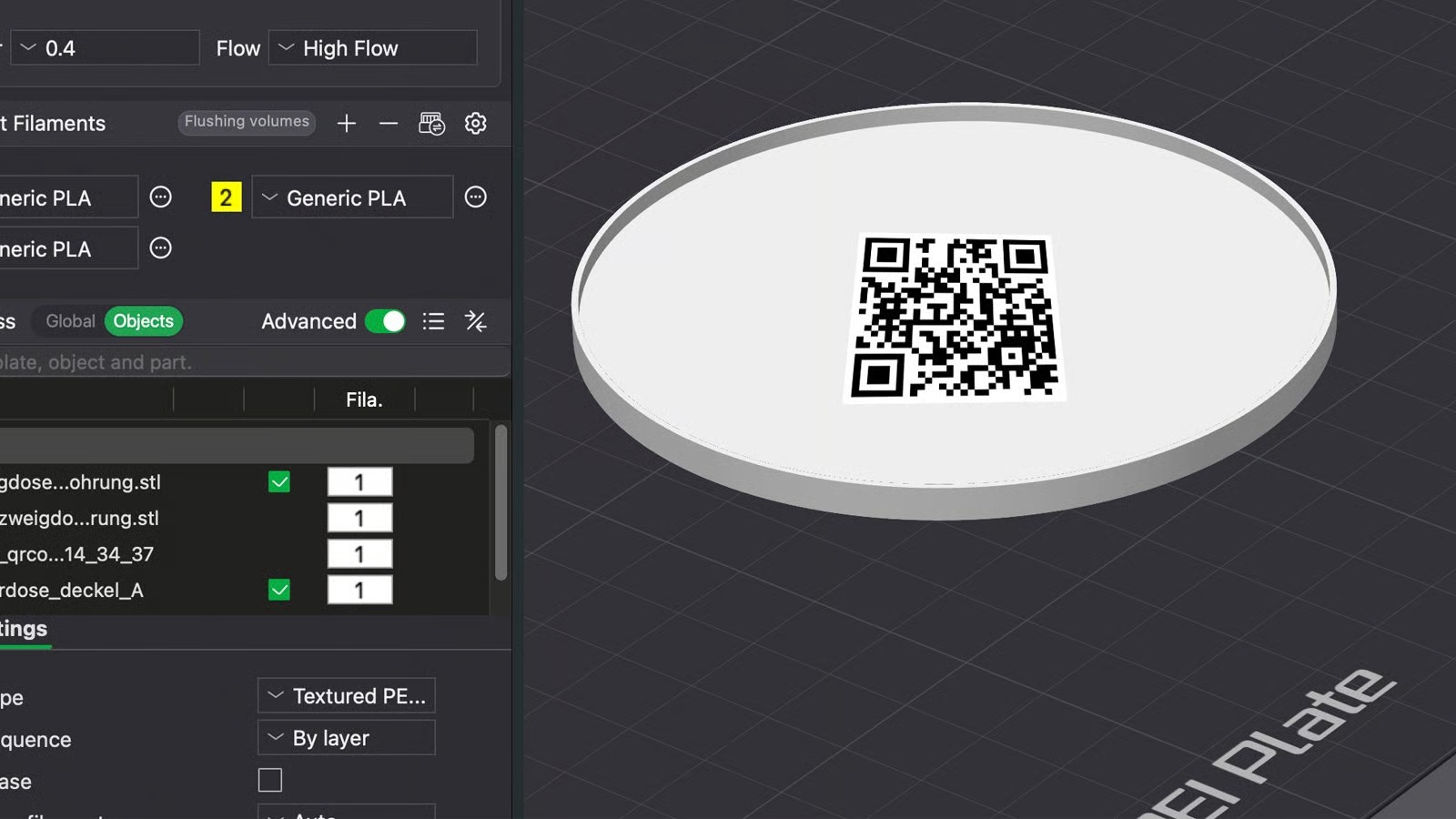
3D printer slicer software, such as Bambu Studio and Prusa Slicer – and more advanced like GrabCAD Print Pro and Materialise Magics – can also place your QR code SVG directly onto your product. In Bambu Studio, for example, with your part open in the slicer, left-click on the part and select “add part” then “SVG”. Then adjust the size and emboss or engrave perimeters.
Step 3: Export
Export your final part as STL with the QR code is part of the product geometry.